Sora Video Downloader
Download AI Videos without Watermark

Paste any Sora video link and get direct download access plus the original prompt used to create the video. Free, fast, and secure.

Guest Limit: 15 free watermark removals per day. Create a free account to get up to 50!

What Is Sora and Why AI Videos Are Trending

What Is Sora AI and Why AI Videos Are Trending

What Is Sora AI (Text-to-Video Model)?

Imagine you could turn a simple line of text—like “a sunset over a mountain river with birds flying”—into a moving video just seconds later. That’s what Sora AI does. Sora is a text-to-video artificial intelligence system developed by OpenAI that creates short AI-generated videos from written prompts. It’s part of the latest wave of creative AI tools that turn imagination directly into visuals instead of still images.

Unlike older video editors that required hours of editing and experience, Sora lets anyone write a description and watch it turn into a cinematic clip with motion and sound, opening new possibilities for creators, marketers, educators, and storytellers.

The Rise of AI-Generated Video Content

AI videos aren’t just a fad—they’re reshaping how content is created. In the past, making even a short video meant filming with cameras or animating frame by frame. Today, tools like Sora harness powerful AI models that learn from patterns in massive datasets to generate realistic motion and dialogue. This means that an idea can become a complete video in minutes. For digital creators, this is a revolution: more output, faster creation, and more creative freedom.

Because of this trend, many people want to download their Sora videos or save shared clips, whether for editing later, showing offline, or using on social media.

Introduction to SoraVidSave – Premium Downloader

SoraVidSave is a purpose-built premium downloader designed specifically for videos created with Sora by OpenAI. As AI-generated video content continues to reshape digital creativity, users need a fast, reliable way to save and manage their Sora videos without losing quality or important prompt data.

Unlike generic video downloaders, SoraVidSave is engineered exclusively for Sora AI content and also support Bulk Downloader. That means better compatibility, cleaner processing, and optimized performance for Sora-generated video formats.

With SoraVidSave, you can:

  • Download Sora videos in original HD quality
  • Remove watermark (when supported)
  • Extract the exact text prompt used to generate the video
  • Save videos instantly without registration
  • Access everything directly from your browser

The platform is built for creators, marketers, educators, AI researchers, and digital storytellers who want full control over their AI-generated media. Whether you’re backing up content, analyzing prompts for inspiration, or preparing clips for editing, SoraVidSave ensures seamless access in just a few clicks.

Security and privacy are also central to the experience. All downloads are processed securely using encrypted connections, and no videos are stored on our servers. Your content remains yours.

As the demand for AI video tools grows, having a specialized Sora video downloader is no longer optional — it’s essential. SoraVidSave delivers speed, simplicity, and reliability in one streamlined solution. Allow users to generate prompts using Prompt Generator for AI Video generation models like SORA, VEO 3, Kling, Seedance 2.0 and more.

Sora Video Downloader Explained

What Is a Sora Video Downloader?

A Sora Video Downloader is a tool—usually a website or app—that lets you save AI videos created on Sora to your device, often in the standard MP4 video format that works on phones, tablets, and computers. These tools take a Sora video link and give you a downloadable file without needing to record your screen or do complicated steps.

In many cases, Sora’s official platform only lets you download videos you made. Downloaders expand on that by allowing you to save any publicly shared Sora video with a shareable link.

How to Download Sora Videos

Three simple steps to download any publicly shared Sora video.

1

Find Video

Browse the Sora app and find a video you want to download. Tap the “Share” button and select “Copy Link”.
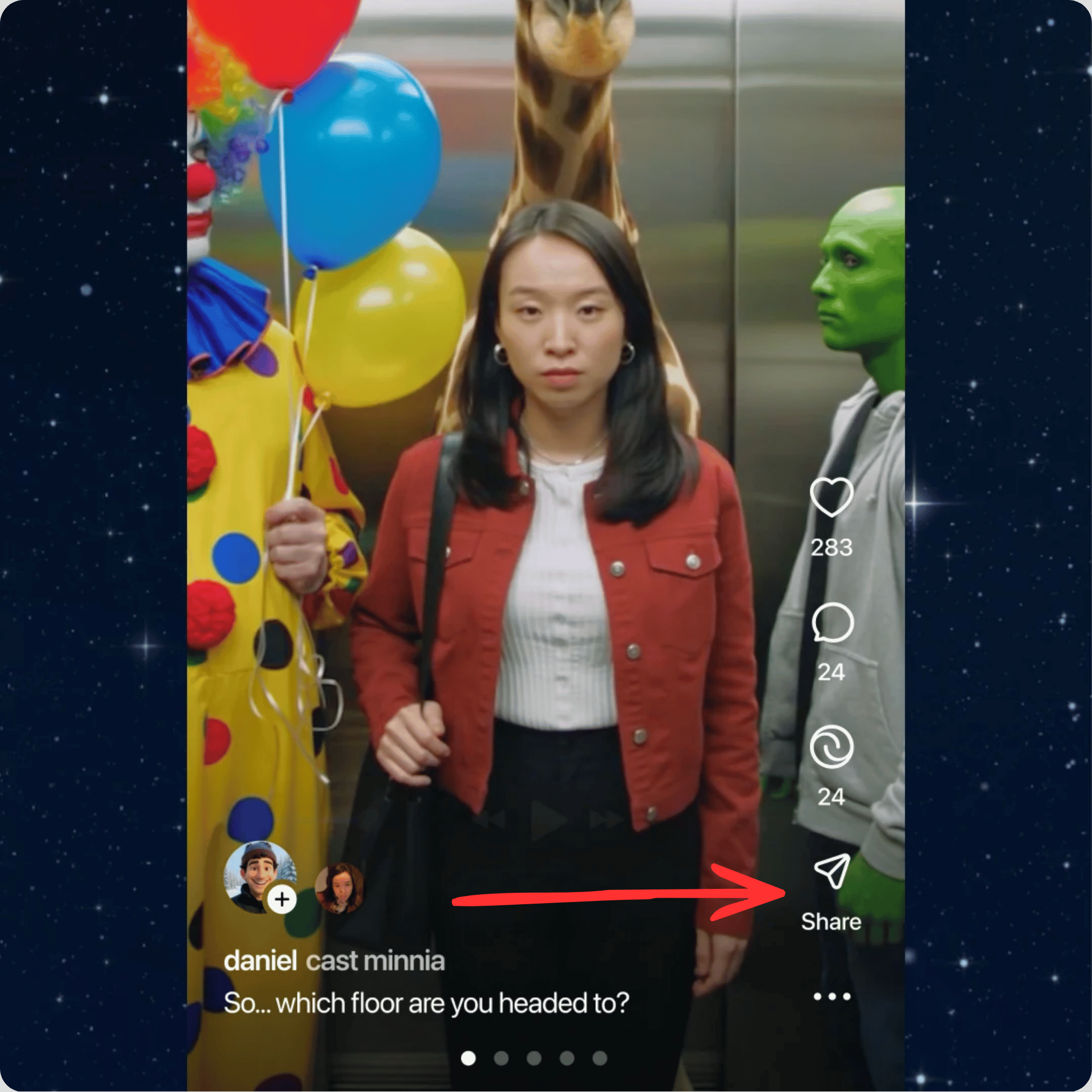
Step 1: Share and copy the Sora video link
2

Paste Link

Paste the copied Sora video link into the input field above.
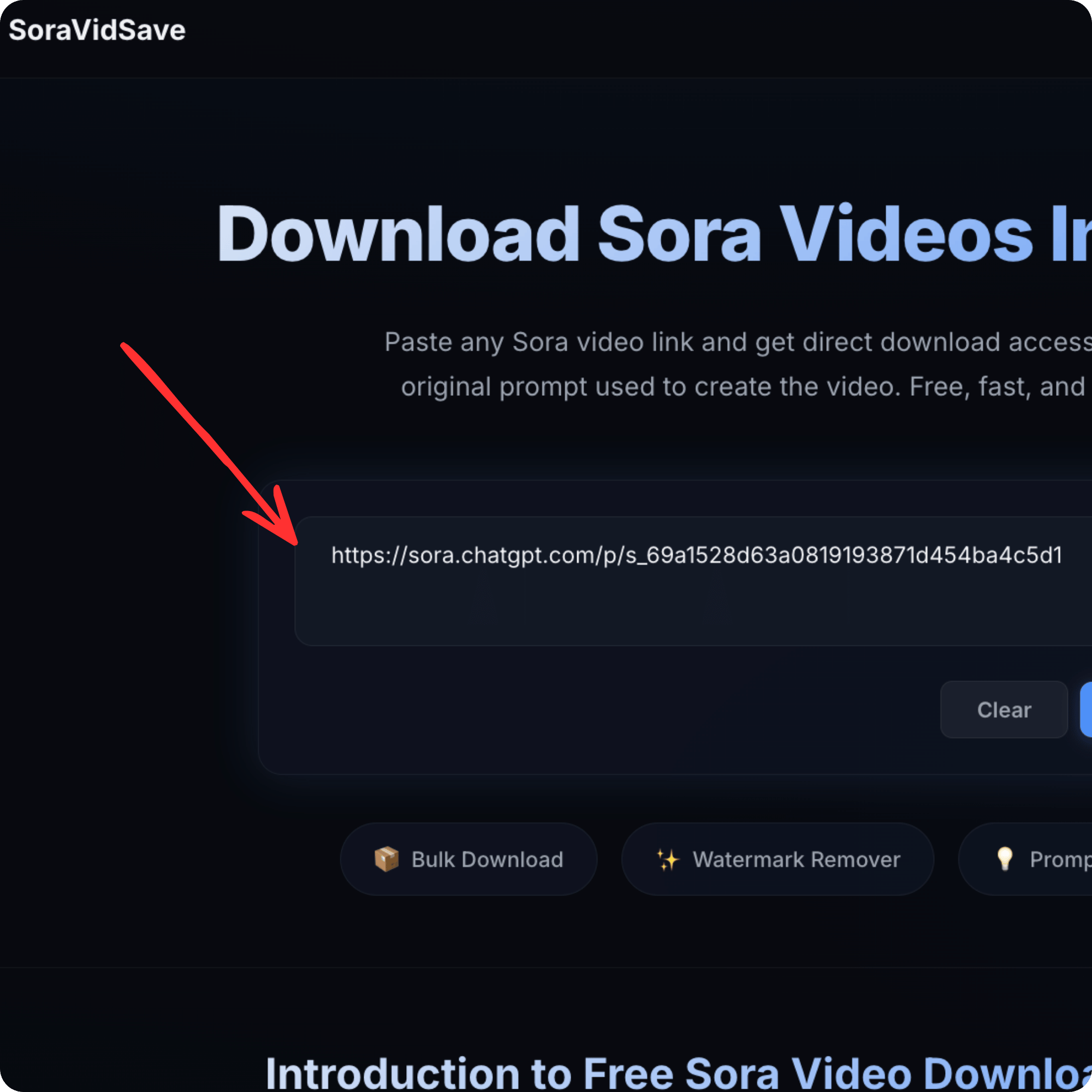
Step 2: Paste the link into SoraVidSave
3

Download & Enjoy

Get your video download link, view the original prompt, and save the video to your device by Clicking on Download Button.
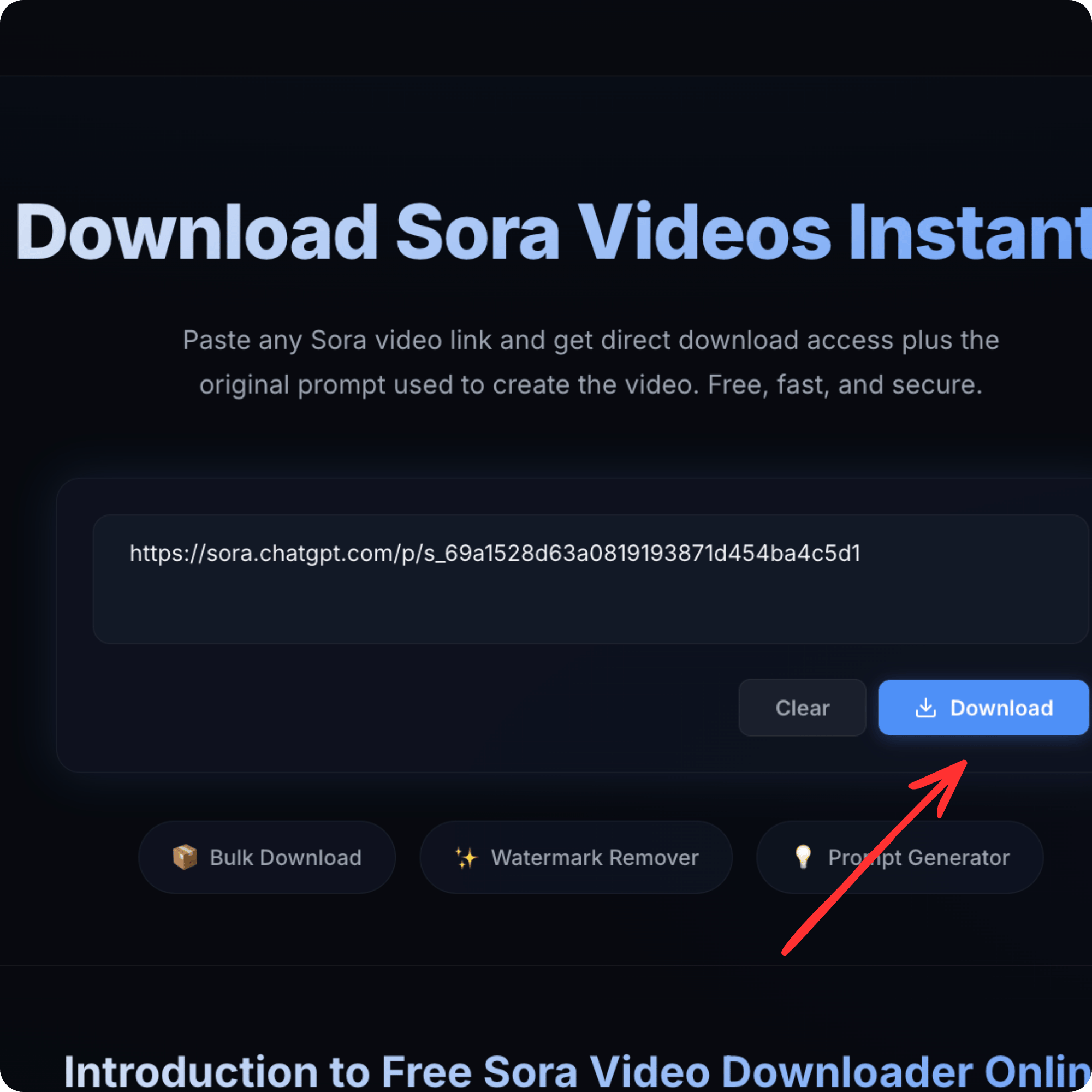
Step 3: Click download and save the video

Why So Many People Save Sora AI Videos

Downloading Shared Videos Beyond Your Own

Sora may let you download your own creations, but many creators want to save publicly shared videos from others. Tools like Sora Video Downloader make this possible by extracting video files from links shared on social media and community feeds. This is especially useful if you find a video that inspires your own work, or if you want to archive content.

Saving High-Quality MP4 Files

Video created by AI looks best when it retains crisp motion and sound. Sora downloaders usually output MP4 files in full original quality without compressing them into blurry versions. That means your videos stay sharp and ready for editing, uploading, or playback anywhere.

Why Choose This Tool?

The most powerful Sora video downloader, designed for speed and simplicity.

Free & Instant

Download Sora videos completely free with instant processing. No registration or hidden fees required.

Original Quality

Download videos in their original quality without any compression or quality loss.

Prompt Extraction

See the exact text prompt that generated the video, giving you insights into AI video creation.

🔒

Secure & Private

Your privacy is protected. We don't store videos or personal information. All downloads are secure.

Best Ways to Download AI-Generated Videos

1. Online AI Video Downloaders (No Installation Required)

The easiest and most popular way to download AI-generated videos is by using browser-based online downloaders. These tools allow you to paste a public video link and instantly generate a downloadable file in formats like MP4. No software installation, account creation, or technical setup is required.

Online downloaders work seamlessly on both desktop and mobile devices, making them ideal for beginners and users who want a fast, hassle-free solution.

2. Browser Extensions & Built-In Download Tools

Some browser extensions add a direct download button to AI video pages, allowing you to save videos with a single click. After installation, these tools integrate into your browser for quick access whenever you're viewing a video.

While extensions can speed up the process, they may require additional browser permissions. Always install extensions from trusted sources to ensure security and privacy.

3. Mobile Apps for Downloading AI Videos

For users who prefer downloading videos directly to their smartphones, mobile applications offer a convenient solution—particularly on Android devices. These apps allow you to save AI-generated videos for offline viewing and sharing.

When choosing a mobile app, look for strong user ratings, clear privacy policies, and secure processing to protect your data.

4. Using the Official Platform’s Built-In Download Option

In many cases, the official AI video platform itself may provide a built-in download or export feature. For example, videos created using Sora may include a share or export option depending on user access and account permissions.

If available, this is the most direct method since it allows you to download your own generated videos in their original format without using third-party tools. Always check the platform’s settings or export options before exploring alternative download methods.

Tips for Best Results When Downloading

Avoiding Watermarks

Some Sora videos may have watermarks or branding. Downloaders usually preserve whatever is in the original video, so if you want a clean version:

  • Generate your own video without a watermark.
  • Use tools that let you remove watermarks responsibly (only on videos you own).

Remember: removing watermarks from videos you don’t own can be unethical and possibly against posting guidelines.

Keeping Original Quality

Always choose tools that promise original quality downloads so your videos look sharp and professional. Many downloaders guarantee this as part of their service.

Get a Sora 2 Invite Code

To get a Sora 2 invite code for Sora, the best approach is to join the official OpenAI Discord server and monitor the “Sora 2 codes” channel where users frequently share invites. You can also check discussions on Reddit (especially r/SoraAi) or search for fresh codes on X. Some existing users receive friend passes to share, and having a ChatGPT Plus or Pro account may improve your chances. Avoid buying codes, as this often leads to scams or account issues.

Read More

Safety and Legal Considerations

Copyright and Sharing Rights

Downloading content you did not create may involve copyright issues. Always respect creators’ rights and only save videos that are publicly shared or that you have permission to download.

Downloading videos for personal offline use is often okay, but posting them elsewhere without permission could violate rules or platform policies.

Safe Tools vs Risky Tools

Choose trusted tools with good reviews and privacy guarantees. Some free download sites may inject ads or try to track usage, so pick ones that clearly state they protect privacy and don’t store data.

Conclusion

Sora’s AI video technology makes creative video generation easy and exciting. But sometimes you want to keep those videos on your device, upload them elsewhere, or simply watch them offline. That’s where SoraVidSave.com come in: Its let you save AI-generated clips quickly, safely, and in high quality—often without installing complicated software. By using trusted downloaders, following simple steps, and respecting creator rights, you can build an awesome collection of AI-powered video content ready for editing, sharing, or inspiration.

Frequently Asked Questions

Everything you need to know about downloading Sora videos.

Yes — if the video is publicly shared with a link, many download tools let you save it without logging into Sora.
Most online downloaders are free, but always make sure you’re using a safe, trusted site.
Yes, SoraVidSave.com is completely free to use. There are no hidden costs or subscription fees. You can download as many Sora videos as you want without paying anything.
Yes — reliable tools download MP4s in original quality, not compressed versions.
Yes, SoraVidSave.com let you download multiple Sora videos at once.
Only if the creator allows it or it’s clearly shared publicly; using someone else’s content without permission may violate laws or platforms’ rules.
No, SoraVidSave.com is an independent tool developed to help users download publicly shared Sora videos. We are not affiliated with, endorsed by, or connected to OpenAI or the Sora team in any way.

Start Downloading Sora Videos Today

Join thousands of users who download Sora videos instantly. Free to start, upgrade for bulk downloads.

Get StartedView Pricing Plans